Introduction
OpsRamp employs multiple mechanisms to ensure user authentication and data security. One of these mechanisms is Duo Security, which adds an extra layer of protection through multi-factor authentication.
Enabling Duo Security requires configuration on both Duo and OpsRamp platforms. This integration ensures that users verify their identity using Duo before accessing OpsRamp, reducing the risk of unauthorized access and enhancing compliance with security standards.
Prerequisite
- Registration with OpsRamp to receive OpsRamp login credentials.
- Your custom branding URL (such as
<yourwebsitename>.opsramp.com).
Duo configuration
- Log into duo.com
- Go to Applications > Applications > +Add application. Application Catalog page lists the different types of services you can protect with Duo Security.
- From the list of applications, search for Web SDK, and click +Add.
- From the Web SDK application properties screen, make note of the Integration key (ikey), Secret key (skey), and API hostname.
You will need these keys and hostname when configuring OpsRamp to work with Duo Security.- The integration key and secret key uniquely identify a specific application to Duo Security.
- The API hostname is unique to your account.
OpsRamp configuration
Once you have completed the configurations in Duo.com, you can continue with the next set of configurations in the OpsRamp console.
To enable Duo security:
- Navigate to Setup → Account. The Account Details page is displayed.
- Click SETTINGS.
- From ACCOUNT SETTINGS page, click SECURITY.
- In the ACCESS MANAGEMENT section, select the Enable Duo Security MFA Configuration checkbox.
- Enter the following information (provided in the Duo application):
- Integration key (ikey)
- Secret key (skey)
- API hostname
- Click SAVE.
Activate Duo security for partner or client user
Note: As a partner or client user, you can activate Duo security from your end.
To activate Duo security:
- Login to OpsRamp using your username and password. The Activate Two-Factor Authentication page is displayed.
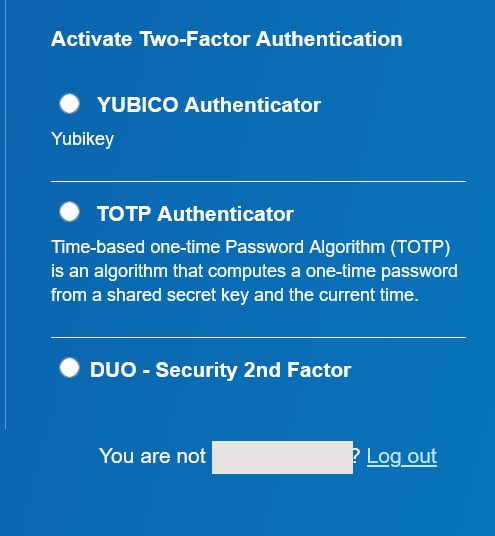
- Select DUO - Security 2nd Factor.
- Select an option and follow the instructions. The OpsRamp homepage is displayed.
External reference
×![]()